Image support
Image support
Bu modül için tahmini süre: 10 dakika
Genel bakış
Claude’un vision capability’leri, mesajlara image eklemene ve onları sayısız şekilde analiz ettirmene imkân tanır. Bu derste image gönderiminin temellerini, limitleri, message yapısını ve image prompt’larında doğruluğu nasıl artıracağını öğreneceksin.
Claude’un vision capability’leri, mesajlarına image eklemeni ve Claude’a onları sayısız şekilde analiz ettirmeni sağlar. Claude’tan bir image’de ne olduğunu açıklamasını isteyebilir, birden fazla image’i karşılaştırabilir, object sayabilir veya karmaşık visual analiz task’ları yaptırabilirsin.
Image handling temelleri
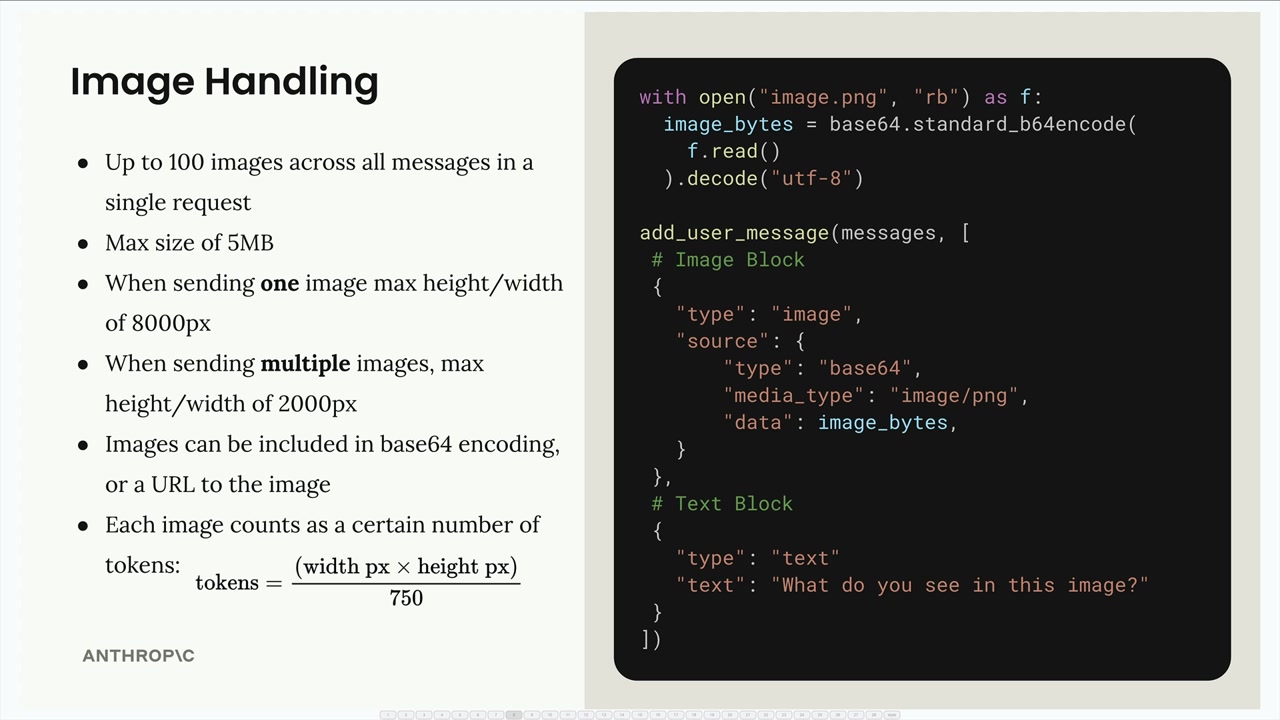
Image’larla çalışırken aklında tutman gereken önemli kısıtlar var:
- Tek bir request’teki tüm mesajlar boyunca toplam 100 image’a kadar
- Image başına maksimum 5MB boyut
- Tek image gönderirken: maks 8000px yükseklik/genişlik
- Birden fazla image gönderirken: maks 2000px yükseklik/genişlik
- Image’lar base64 encoding olarak veya bir URL olarak eklenebilir
- Her image, boyutuna göre token olarak sayılır:
tokens = (width px × height px) / 750
Claude’a image göndermek için, user mesajında text block’larla birlikte bir image block dahil edersin. Yapı şöyle:
with open("image.png", "rb") as f:
    image_bytes = base64.standard_b64encode(f.read()).decode("utf-8")

add_user_message(messages, [
    # Image Block
    {
        "type": "image",
        "source": {
            "type": "base64",
            "media_type": "image/png",
            "data": image_bytes,
        }
    },
    # Text Block
    {
        "type": "text",
        "text": "What do you see in this image?"
    }
])
Message flow
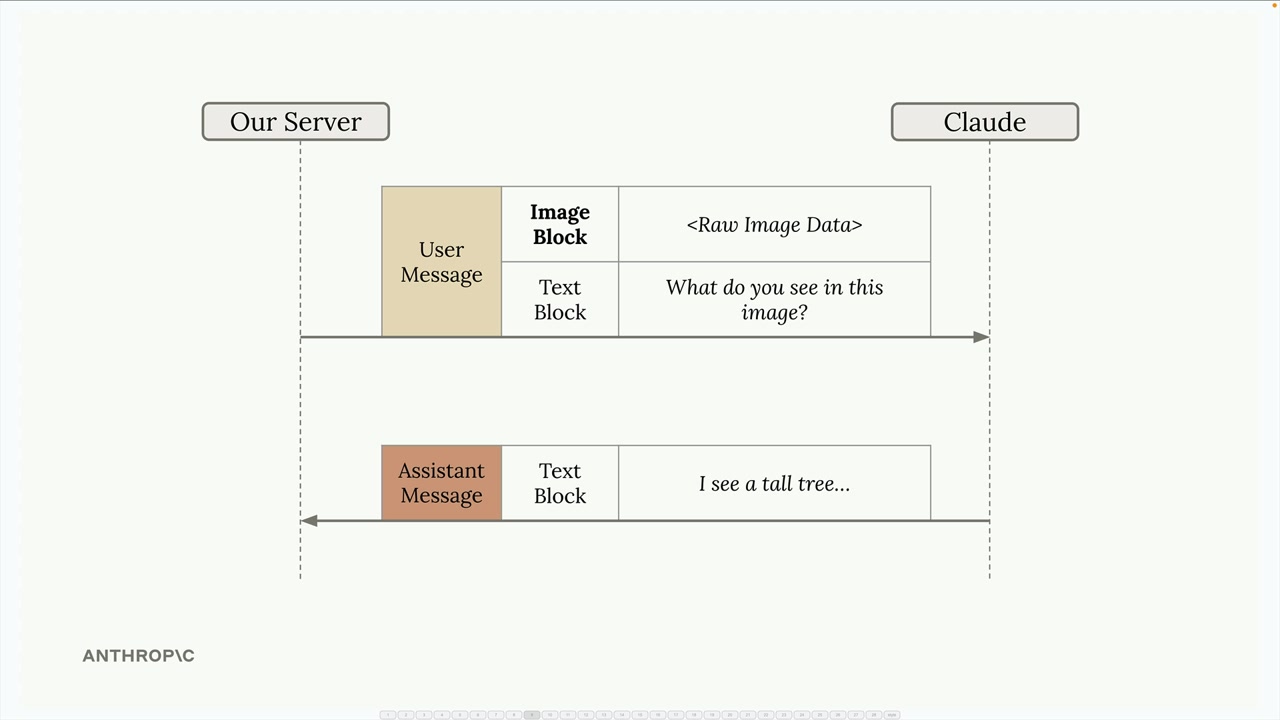
Conversation, yalnızca text içeren etkileşimlerle aynı şekilde çalışır. Server’ın hem image hem text block içeren bir user mesajını Claude’a gönderir ve Claude analizini içeren bir text block ile yanıt verir.
Prompting teknikleri
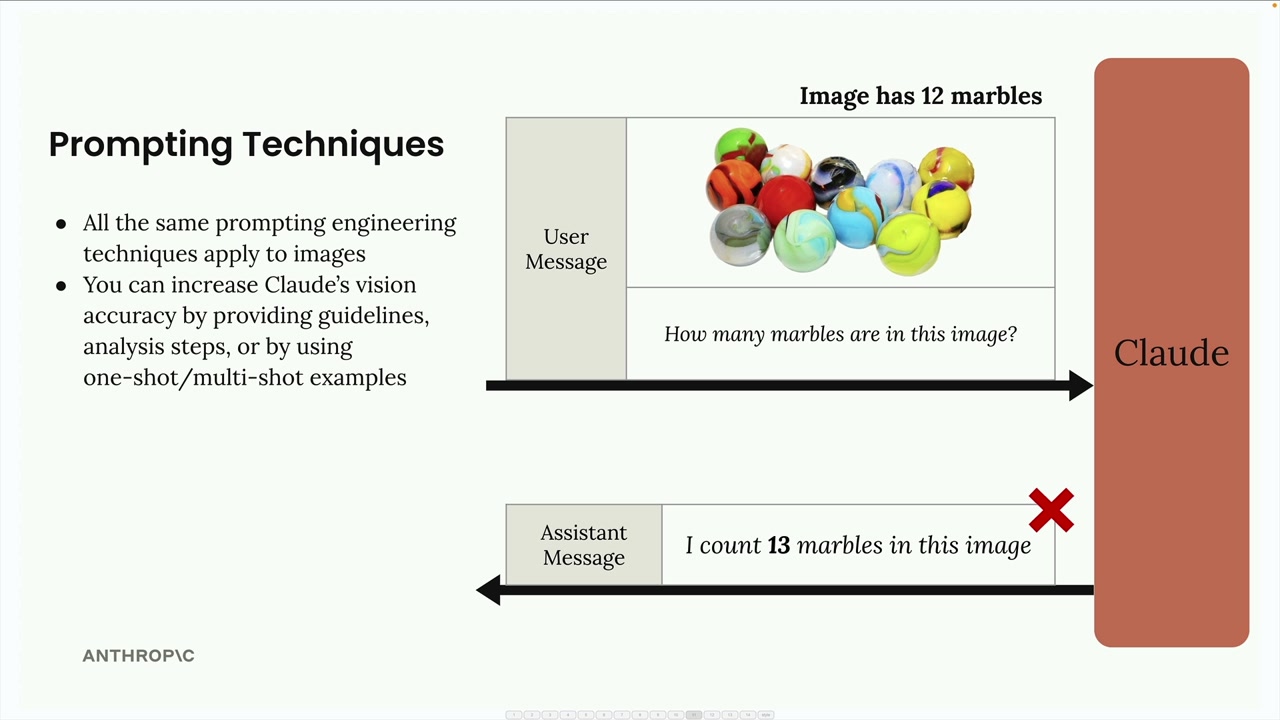
Image’larla iyi sonuç almak için anahtar, text’te uyguladığın aynı prompting engineering tekniklerini uygulamaktır. Basit prompt’lar genelde kötü sonuca yol açar. Örneğin, “Bu image’de kaç marble var?” diye sormak yanlış bir sayım döndürebilir.
Claude’un doğruluğunu dramatik olarak artırabilirsin:
- Detaylı yönergeler ve analiz adımları sağlayarak
- One-shot veya multi-shot example’lar kullanarak
- Karmaşık task’ları daha küçük adımlara bölerek
Adım adım analiz
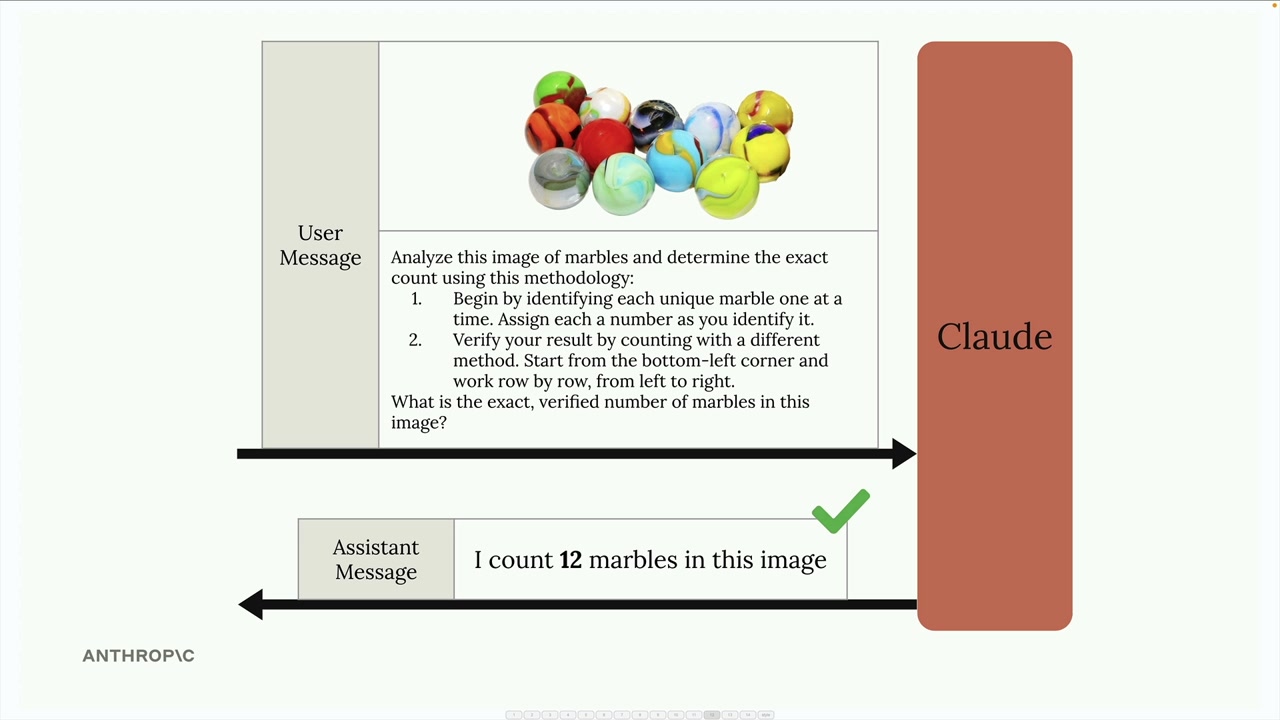
Basit bir soru yerine Claude’a bir methodology sağla:
Analyze this image of marbles and determine the exact count using this methodology:
1. Begin by identifying each unique marble one at a time. Assign each a number as you identify it.
2. Verify your result by counting with a different method. Start from the bottom-left corner and work row by row, from left to right.

What is the exact, verified number of marbles in this image?
One-shot örnekler
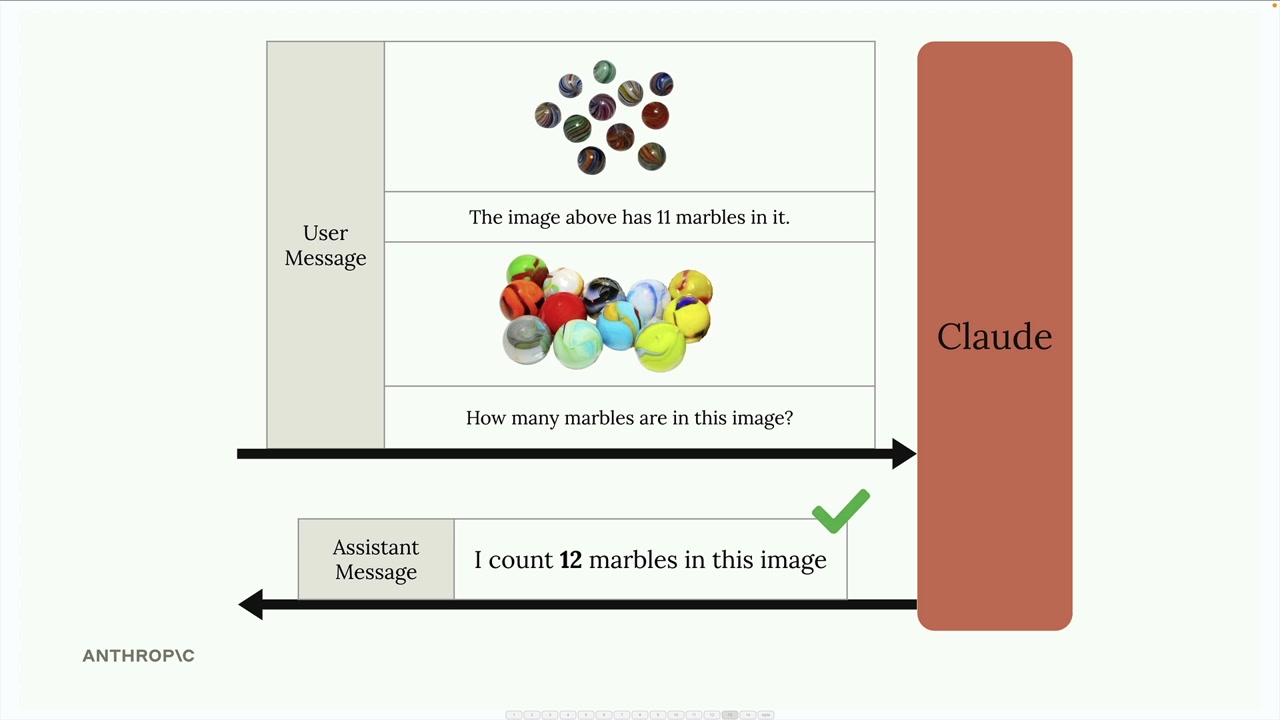
Doğruluğu mesajının içinde örnekler sağlayarak da artırabilirsin. Sayısı bilinen bir image ekle, doğru yanıtı belirt, sonra hedef image’in hakkında sor. Bu, Claude’a istediğin analiz tipi için bir referans noktası sağlar.
Gerçek dünya örneği: Fire risk değerlendirmesi
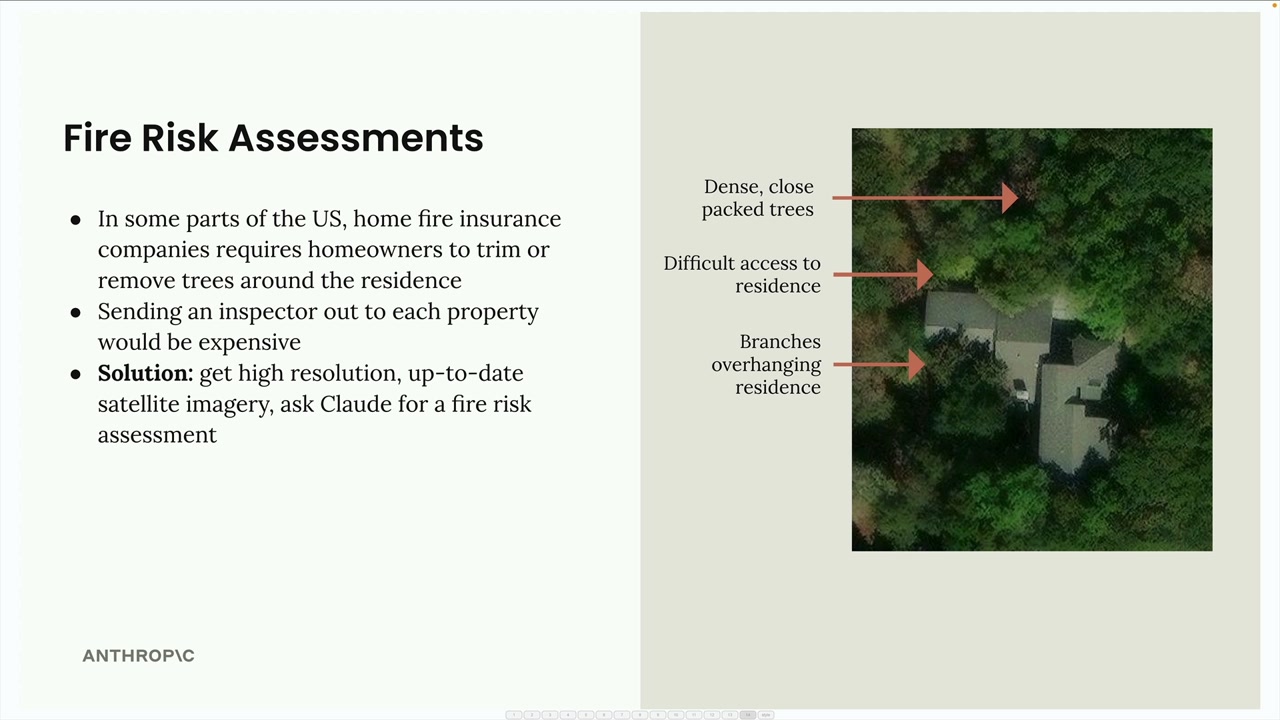
İşte pratik bir uygulama: home insurance için fire risk değerlendirmelerini otomatikleştirmek. Her property’e müfettiş göndermek yerine, sigorta şirketleri satellite imagery ve Claude’un analizini kullanabilir.
Sistem, şunları tespit etmek için satellite image’ları analiz eder:
- Konutun yakınındaki yoğun, sık ağaçlar
- Acil hizmetler için zor erişim rotaları
- Konutun üstüne sarkan dallar
“Fire risk score ver” gibi basit bir prompt yerine, iyi yapılandırılmış bir prompt analizi spesifik adımlara böler:
Analyze the attached satellite image of a property with these specific steps:

1. Residence identification: Locate the primary residence on the property by looking for:
   - The largest roofed structure
   - Typical residential features (driveway connection, regular geometry)
   - Distinction from other structures (garages, sheds, pools)

2. Tree overhang analysis: Examine all trees near the primary residence:
   - Identify any trees whose canopy extends directly over any portion of the roof
   - Estimate the percentage of roof covered by overhanging branches (0-25%, 25-50%, 50-75%, 75%+)
   - Note particularly dense areas of overhang

3. Fire risk assessment: For any overhanging trees, evaluate:
   - Potential wildfire vulnerability (ember catch points, continuous fuel paths to structure)
   - Proximity to chimneys, vents, or other roof openings if visible
   - Areas where branches create a "bridge" between wildland vegetation and the structure

4. Defensible space identification: Assess the property's overall vegetative structure:
   - Identify if trees connect to form a continuous canopy over or near the home
   - Note any obvious fuel ladders (vegetation that can carry fire from ground to tree to roof)

5. Fire risk rating: Based on your analysis, assign a Fire Risk Rating from 1-4:
   - Rating 1 (Low Risk): No tree branches overhanging the roof, good defensible space around the home
   - Rating 2 (Moderate Risk): Minimal overhang (<25% of roof), some separation between tree canopies
   - Rating 3 (High Risk): Significant overhang (25-50% of roof), connected tree canopies, multiple vulnerability points
   - Rating 4 (Severe Risk): Extensive overhang (>50% of roof), dense vegetation against structure

For each item above (1-5), write one sentence summarizing your findings, with your final response being the numerical rating.
Bu detaylı prompt, Claude’u sistematik bir analiz boyunca yönlendirir ve basit bir taleple sağlanabilecek olandan çok daha doğru ve faydalı değerlendirmelerle sonuçlanır.
Unutma: text’te işe yarayan aynı prompting teknikleri image’lara da uygulanır. Güvenilir sonuç istiyorsan basit sorulara bel bağlamak yerine detaylı, yapılandırılmış prompt’lar yazmaya zaman ayır.
Temel çıkarımlar
- Image gönderme limitleri: 100 image/request, 5MB, 8000px (tekli) veya 2000px (çoklu)
- Token maliyeti yaklaşık
(width × height) / 750 - Image’lar message içinde image block + text block birleşimi olarak gönderilir
- Vision için de aynı prompt engineering ilkeleri geçerli: methodology, one-shot, adım adım analiz
- Karmaşık vision task’ları (örn. satellite image fire risk) yapılandırılmış multi-step prompt’larla daha doğru sonuç verir